Features
Everything the work needs, connected.
Each feature below is working software, not a roadmap.
01Rental
Rental lifecycle
From the first call to the return at the gate.
- Enquiries and quotes
- Customer, asset type, dates and site logged by sales, then priced by the day, week or month.
- Bookings and contracts
- A quote becomes a contract with its rate, its minimum hire and its daily allowance.
- PDI and handover with signature
- A pre-dispatch inspection, then a gate handover with signatures.
- Meters in hours, km or miles
- Readings per asset per day, typed in or pasted from Excel. Each asset is measured in its own unit.
- Returns
- Assets checked back in at the gate, ready for the next hire.
- Sub-lease (hire-in) tracking
- Units hired in from other companies, tracked with their own costs.
02Money
Billing, tax and money
What was used, what is owed and what each asset earns.
- Hire billing by day, week or month
- Minimum hire periods, allowances and extra use, worked out from the contract and the readings.
- Revenue-leakage detection
- Extra hours never billed, rent not invoiced and hours that cannot be checked, found with the same rules the invoices use.
- Invoices with your country's tax
- Invoices drafted by themselves when a billing period ends, with hire, extra use and VAT, GST (CGST, SGST and IGST) or US sales tax. Finance reviews and approves before anything reaches receivables.
- ZATCA e-invoicing for Saudi Arabia
- Tax invoices with the ZATCA QR code, and reporting and clearance through FATOORA with each company's own certificates.
- Credit notes
- Raised against an invoice and approved by finance.
- Credit control
- Credit limits per customer, holds placed and lifted, time-limited exemptions and payments received, kept on record for finance.
- Profit per asset (Pro and Elite)
- Revenue, maintenance cost and depreciation for each asset, so you can see which units earn and which only cost.
03Workshop
Service and job cards
Every service, visit and part accounted for.
- Preventive maintenance
- Service job cards raised by themselves when an asset approaches its service interval, with the parts list from its last service.
- Supervisor, warehouse, technician
- Assign the job, prepare and issue the parts, record every site visit with readings and pictures, return unused parts, approve the time and cost.
- Parts and warehouse
- Parts prepared per job with prices, issue verified by the warehouse, and returns checked back in, so every part is accounted for.
- Breakdowns
- Logged as emergency job cards, from the office or by the technician on site.
04Elite plan
Engine Rebuild Center
Included in the Elite plan. For workshops that overhaul engines, generators and components.
- Rebuild board by stage
- Every job in the stage it has reached, with its planned dates and whether it is running late.
- Bay board
- Which unit stands in which bay: workshop, yard, machine shop or test cell.
- A 15-stage template with forecasts
- Each stage has a forecast day, so every job has an estimated ready date from the day the unit arrives.
- Stage photos and a photo report
- Photos are taken at the stages that need them before the stage is ticked, then put into a captioned photo report.
- Technician time clock and tasks
- Technicians clock on and off jobs and tick their tasks. No money is shown to technicians, on any screen.
- Service requests and customer units
- Requests logged against the customer's own engines, generators, transmissions, compressors and components.
- QR labels
- A label for each job and each customer unit. Scan it and the unit opens in the app.
- A live tracker link for the customer
- Send a link by WhatsApp or email. It shows the stage and the estimated ready date only: no prices, no internal notes, no sign-in.
- Downtime
- Days in the shop, split into waiting for approval, waiting for parts and in repair.
05Control
Roles, approvals and audit
Everyone sees their own work, and money moves only when someone signs.
- Six roles, one system
- Admin, finance, sales, supervisor, technician and warehouse each see only their own screens and data.
- Approvals
- The supervisor approves job cards. Finance approves invoices and credit notes.
- Audit log
- Every step is recorded by name, so you can see who did what and when.
- Your data stays yours
- Each company's data is kept strictly separate. Payments are handled by Stripe; card details never touch our servers.
06Data
App, exports and API
Your figures wherever you need them.
- Android app
- The FleetAsset360 app on Google Play: hours and extra hours, job cards, visits with pictures, parts and approvals. Get the apps.
- Excel exports
- Download your lists and reports to Excel, and paste a month of readings in from Excel.
- API (Elite plan)
- Read-only API keys for your own systems, and a full export of your data whenever you want it.
- Customer portal (Pro and Elite)
- Your customers sign in with a password and a one-time code and see only their own issued invoices and credit notes. On the Elite plan they also follow their rebuild jobs and approve or reject rebuild quotes there. You invite them and can switch an account off at any time.
Product tour
The screens behind the features
Real screens from the FleetAsset360 app.
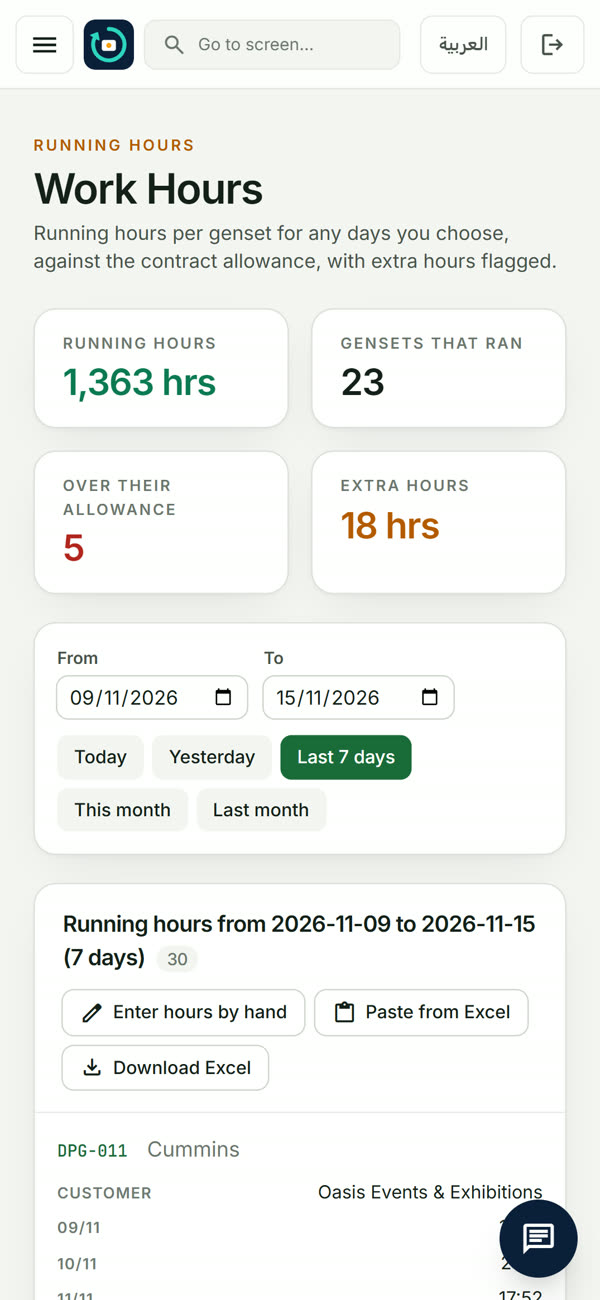
Every hour on the meter, against the contract
Enter readings per asset per day, or paste a month from Excel. FleetAsset360 compares them with each contract's daily allowance and shows the extra hours to bill, by customer or by asset.
- Hours, km or miles: each asset in its own unit
- Assets over their allowance flagged before the month closes
- The same figures feed the invoice and the service plan
A real screen from the FleetAsset360 app.
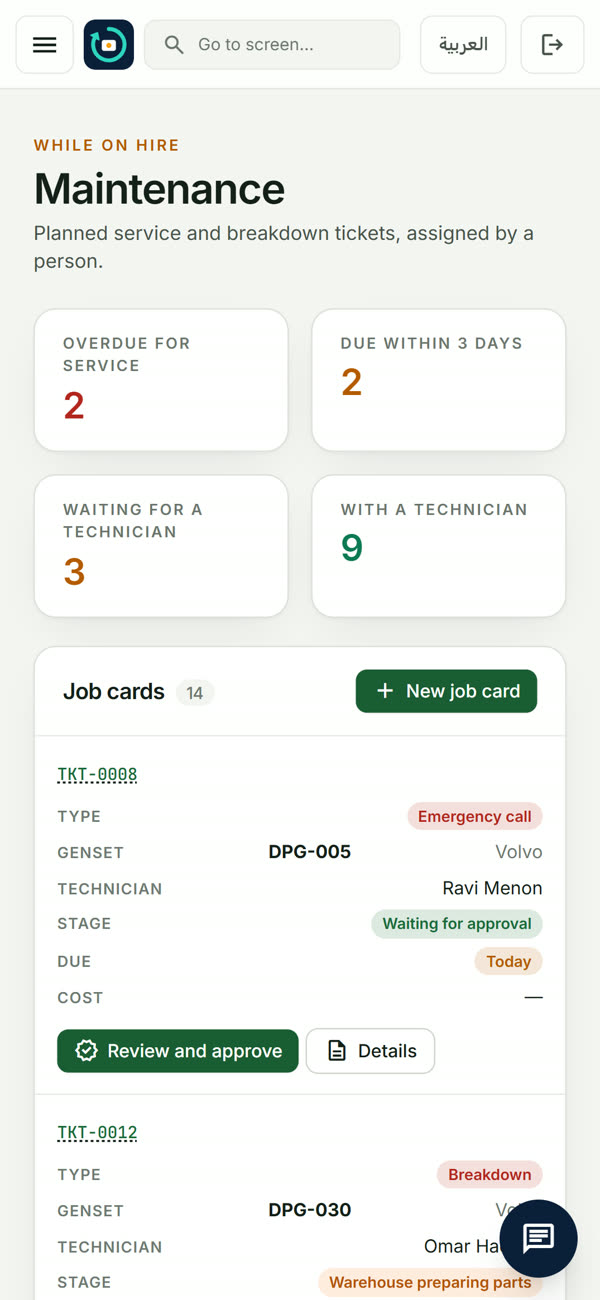
Services raised before they are due
When an asset nears its service interval, a job card raises itself with the parts list from the last service. Overdue and due-soon work is on one screen.
- Service intervals in hours or distance
- Breakdowns logged as emergency job cards
- Maintenance cost lands on the asset that caused it
A real screen from the FleetAsset360 app.
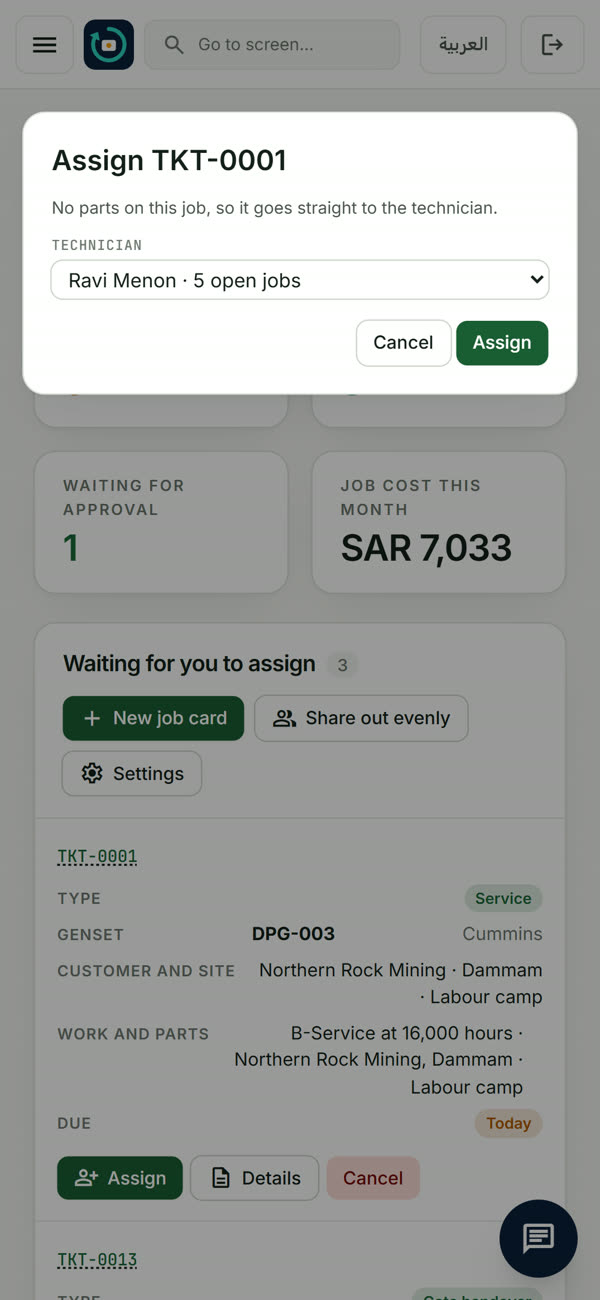
Assign the job, prepare the parts
The supervisor assigns each job card to a technician; the warehouse is told what to prepare and verifies every part issued and returned.
- Supervisor → warehouse → technician, step by step
- Every step recorded by name
- Time, travel and extra costs approved by the supervisor
A real screen from the FleetAsset360 app.
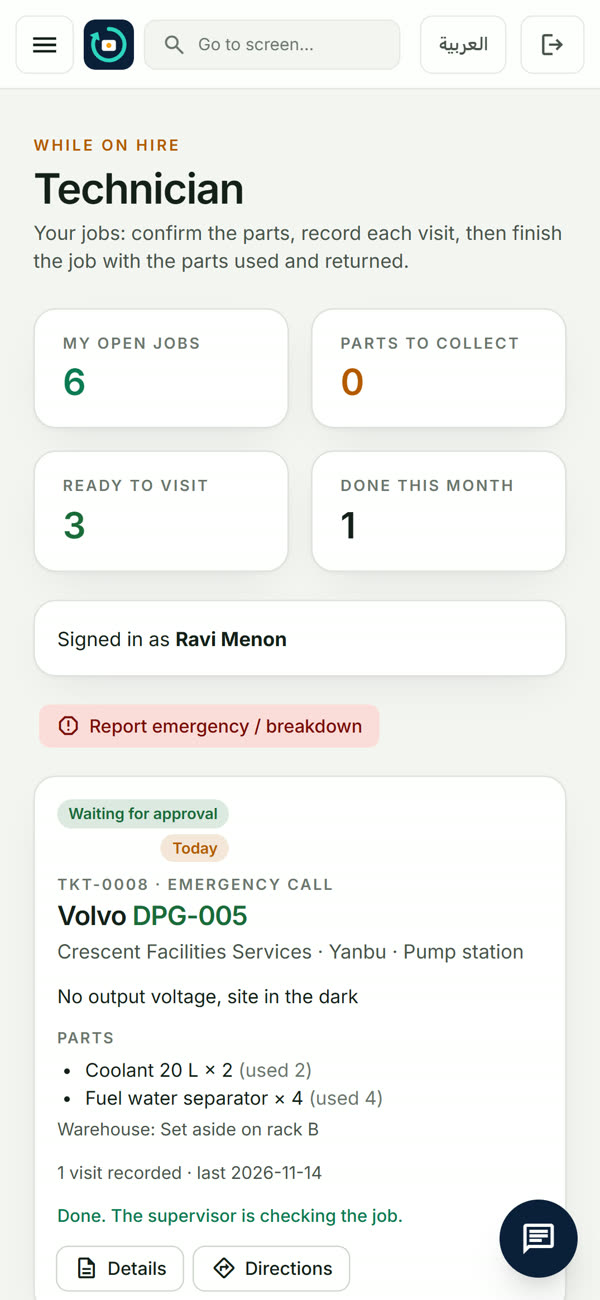
The field team on the Android app
Technicians see only their own jobs, without prices. They confirm the parts, record each visit with times, readings and pictures, and finish the job on site.
- Camera for job-card pictures
- Directions to the asset
- Works for every role, each with its own screens
A real screen from the FleetAsset360 app.
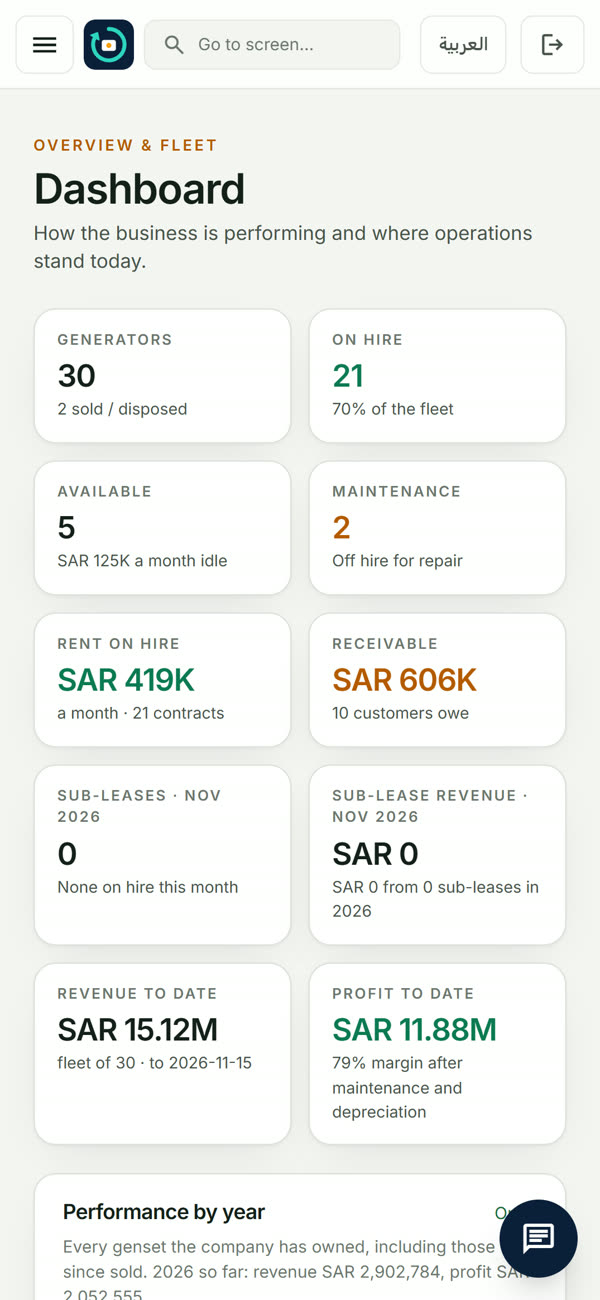
The whole business on one screen
Assets on hire, available and in the workshop, rent on hire, what customers owe, revenue and profit to date, for the owner and finance.
- On hire, available and in maintenance at a glance
- Receivables and customers who owe
- Revenue and profit after maintenance and depreciation
A real screen from the FleetAsset360 app.
The job card, end to end
Every service, visit and part accounted for
- Raised by itself at the service interval, from real running hours
- Supervisor assigns; the warehouse is told what to prepare
- Technician confirms the parts, the warehouse verifies the issue
- One or more visits: travel and work time, readings, pictures
- Unused parts returned and checked back in
- Supervisor approves time, travel and extra costs; the total is added to the asset's maintenance cost
Read-only when you stop paying, never deleted
If a subscription lapses, the account turns read-only: nothing is deleted, and everything comes back the moment a plan is active again. You can download all of your data at any time.
Put rental, service and rebuilds on one system
From £139 a month · Monthly or yearly plans · Change or cancel any time